Every timesheet in. Payroll-ready hours out.
Consultants submit their week from a phone in 30 seconds. Timesheets your clients already approved in Beeline, Fieldglass or a PDF get read for you instead of re-typed. Overtime is split by state. One export goes to payroll.
$5 per consultant who submits in MTT. $2 per consultant whose client timesheets you collect. No minimum.
No credit card. No implementation consultants. Deploy in days, not months.
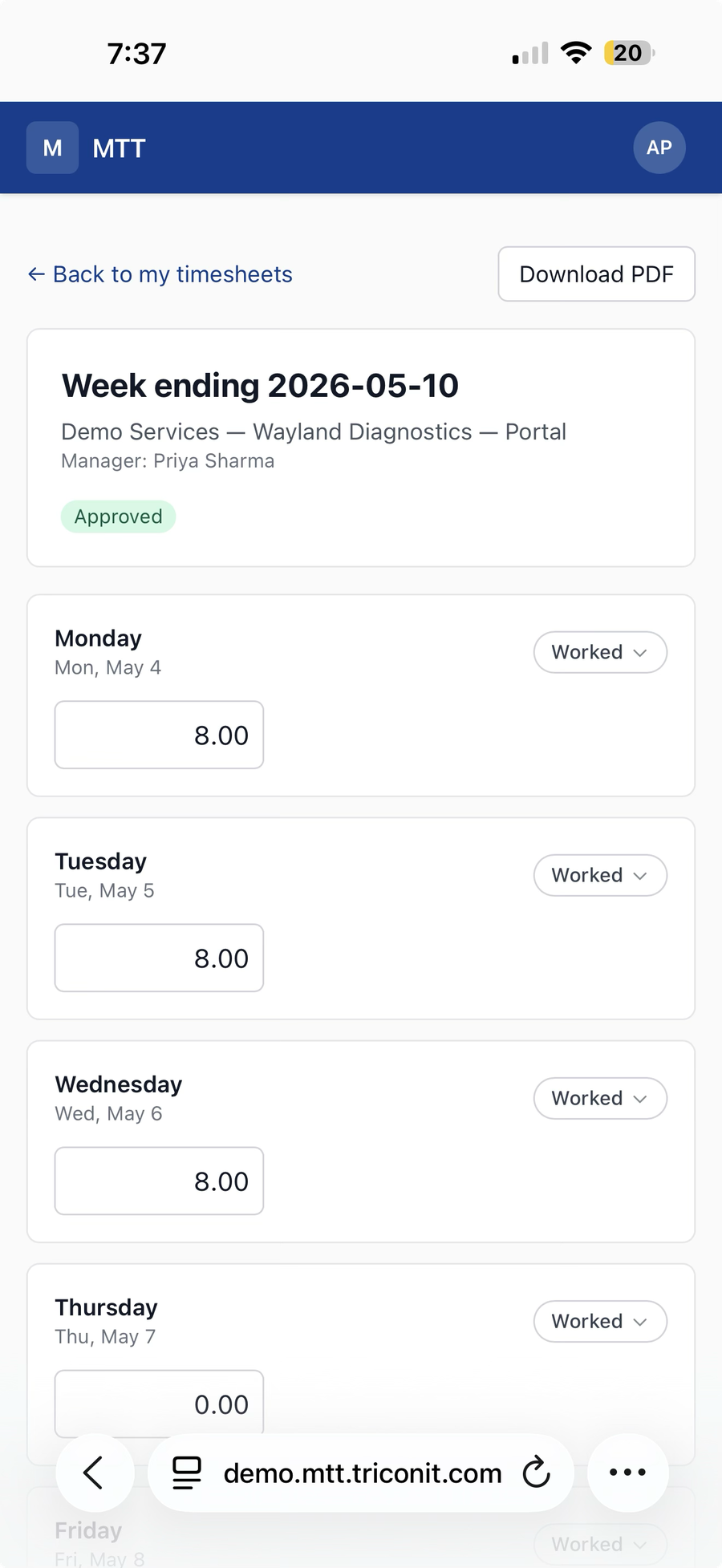
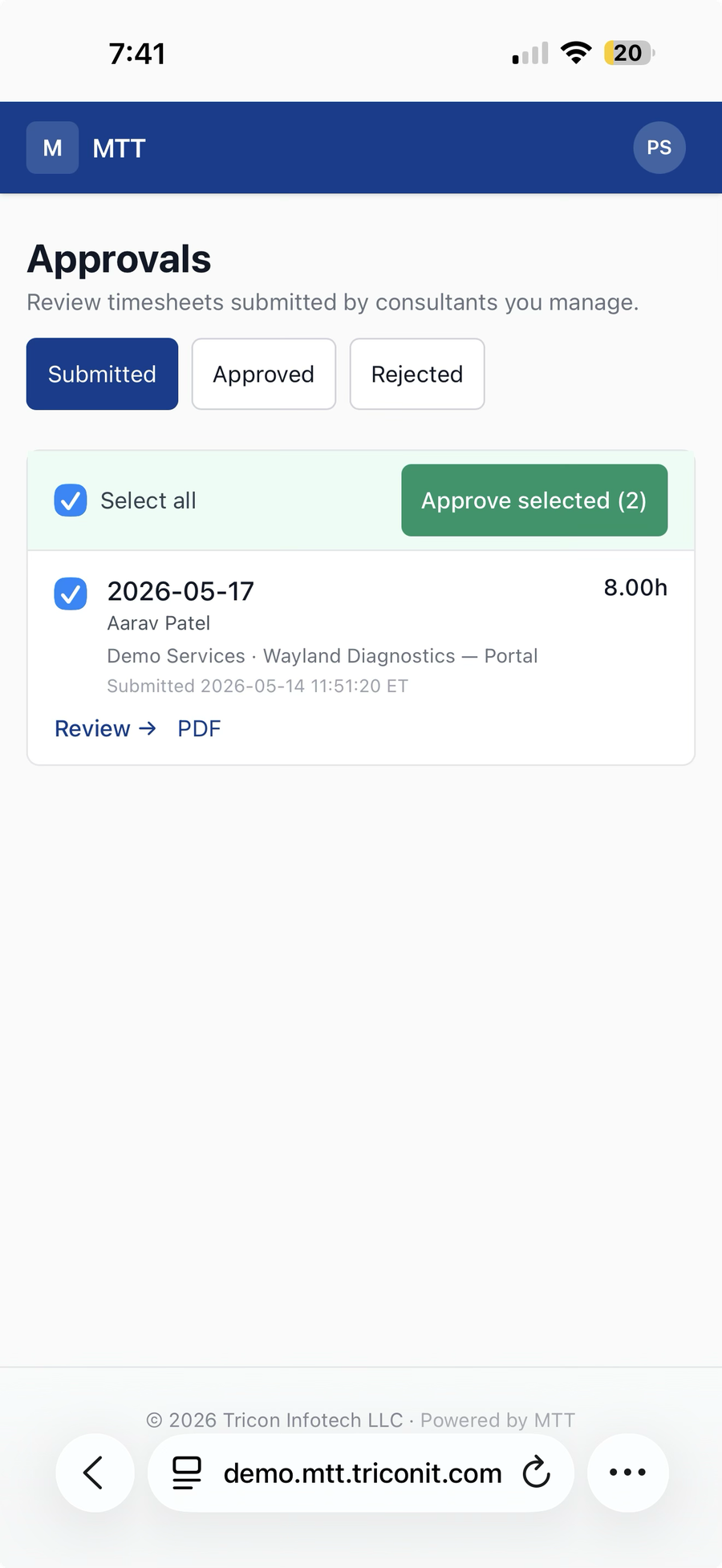
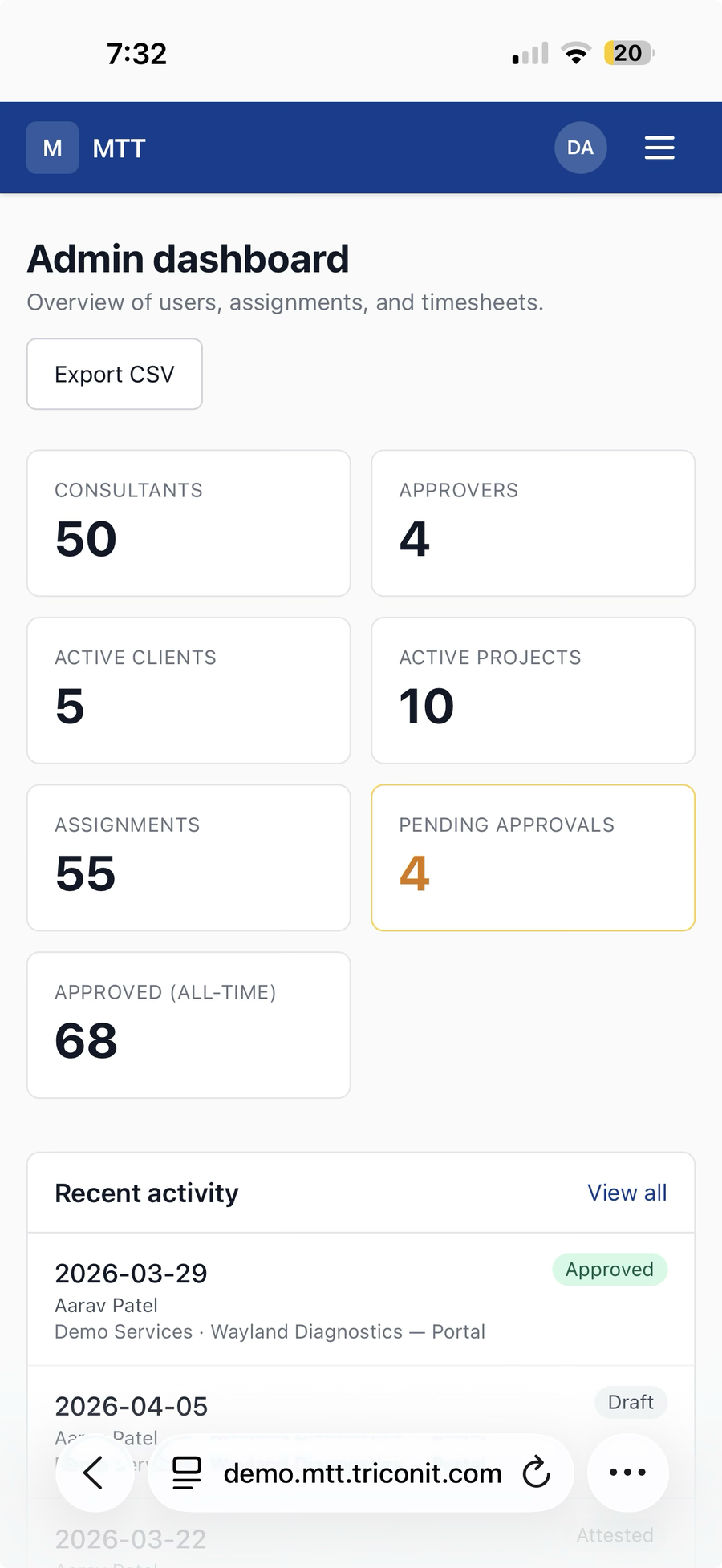
30 seconds to submit. No Friday chase.
Mobile web entry, autosave, copy last week. Self-attested or sent to a client manager or internal approver, set per assignment. Timestamped record and PDF for every week.
Different states, different overtime rules. Split for you.
Each day is tagged with its work state. California daily-8 and double-time after 12, Alaska and Nevada daily-8, Colorado daily-12, federal weekly-40 everywhere else. Payroll export has one row per consultant per state. MTT prepares the hours; your payroll provider runs payroll.
Stop re-typing timesheets your clients already approved.
Forward the email or upload the file. AI reads the PDF, scan or spreadsheet. You check the hours against the original and post. Nothing posts on its own.
It's Sunday, 11pm. Where's Christopher's timesheet?
Your operations lead has been chasing five consultants since Friday. One forgot. Two said they'd send it after dinner. One submitted in the wrong format — again. Meanwhile the hours your clients already signed off on are sitting in an inbox as two PDFs and an Excel export, waiting for someone to type them in before 9am. This happens every week.
The Monday chase
Email reminders, WhatsApp pings, escalations to managers. Manual follow-up burns 8–15 hours every week — every week.
The re-keying
The client's timesheet comes back as an Excel export, a PDF, a screenshot out of Beeline or Fieldglass. Someone types every hour into your own sheet, line by line. One slipped digit is an underpaid consultant or a billing dispute you hear about three weeks later.
Multi-entity mess
You run two LLCs to handle W2 and corp-to-corp. Off-the-shelf tools assume one company. Your data lives in three spreadsheets and a Google Drive folder no one trusts.
Enterprise tools, SMB budget
Workday is for Fortune 500. Paychex bundles payroll you don't need. Replicon starts at "talk to sales." You just want one tool, one price, one job done.
The client's timesheet is already done. Stop typing it in again.
Your consultant filled it in on the client's system. The client signed off. Then it reaches you as an Excel export, a PDF or a screenshot — and somebody in your back office re-keys every hour into your own sheet. MTT Collect takes the file and does that part.
Send it in
Forward the email to your firm's Collect address, or upload the file. One address for the whole firm. Set it up once.
MTT reads the file
AI reads PDFs, scans and images. For a spreadsheet export, MTT proposes which column is which and you okay it once — after that the same layout is recognized on sight.
You review and confirm
Check the extracted hours against the original, decide what's non-billable, and post. Nothing posts on its own. The original file stays attached as proof.
Collected timesheets were already approved at the source. MTT doesn't approve them and neither do you — you confirm the hours were read correctly. There's no login to Beeline, Fieldglass or any other VMS: Collect works from the file they export. It's switched on per account, so ask us to turn it on.
Working in two states this week? We split the overtime for you.
If your consultant works Tuesday and Wednesday in California and Thursday and Friday in New Jersey, the overtime rules are different on each side. Most tools make you split the hours by hand — or worse, get it wrong. MTT does it automatically, every week.
| Day | State | Hours | Rule applied |
|---|---|---|---|
| Tue | CA | 8h | |
| Wed | CA | 10h | → 2h California daily overtime |
| Thu | NJ | 12h | |
| Fri | NJ | 12h |
OT is attributed to the state where it was earned.
Every state's rules are baked in: California daily 8 and double-time after 12, Alaska and Nevada daily 8, Colorado daily 12, federal weekly 40. No pay-rule engine to configure, no spreadsheet column to maintain. The split flows straight into your payroll export, ready for Paychex, ADP, or whatever you use.
Excel costs you a chase team. Workday costs you everything.
Three ways staffing firms manage time today. One of them is built for you.
We tried QuickBooks Time. We tried Paychex. We tried Replicon. All three were so complicated we gave up and went back to Excel. So we built the timesheet platform we actually wanted to use — narrow, fast, obvious. If a consultant can't submit their week in 30 seconds, we got it wrong.
→ Built by staffing operators, not SaaS theorists
Collect. Tally. Pay and bill.
No training. No "implementation phase." Four steps, every week — and nobody in your office retypes an hour.
Collect
Consultants submit their week in MTT from a phone — 30 seconds, self-attested or sent to the client manager for one-click sign-off. Timesheets kept on a client's system come in through MTT Collect: forward the email or upload the file.
Tally
Excel, PDF, scan, VMS export — MTT pulls the hours out and puts every consultant's week in one place. You confirm what it read. No master spreadsheet.
Payroll prep
Hours entered in MTT are split Regular / OT / double-time per state, automatically. Collected hours keep the split the client's timesheet already shows. One export, ready for Paychex, ADP or whatever you use.
Invoicing support
Signed PDFs, client-format exports, and the original file behind every collected hour. MTT isn't your invoicing software — it's the proof you attach to the invoice.
The five things that make this not another timesheet tool.
Every other tool was built for an HR department. MTT was built for the back office of a staffing firm.
MTT Collect
Client timesheets come in as files, not data. Forward the email or upload the file — MTT reads it, extracts the hours, and holds them for you to review and confirm. The original stays attached as proof. How collection works
Multi-state overtime, automatic
Your consultant works Tuesday in California, Thursday in New Jersey. MTT splits the overtime by state automatically — daily-8, double-time after 12, and weekly-40 baked in, no pay-rule engine to configure. The payroll export comes out with the OT already attributed to the right state. Learn how
Flexible attestation
Some MSPs want self-attested. Some want approver sign-off. Toggle per client — same product, two workflows, zero compromise.
MSP-native exports
Any client format, set up once. Your client's billing process doesn't change.
Mobile-first by default
Your consultants live on their phones. MTT was designed for thumb-typing on a Friday afternoon — not retrofitted onto a desktop tool from another era.
Consultant experience
- Mobile-first submission
- Copy from last week
- Worked, sick, PTO, holiday, off
- Multi-state overtime tracking
- Self-attestation when client requires
Approval workflows
- Submission notifications by email
- Bulk approve multiple weeks
- Filter by submitted / approved / rejected
- Per-timesheet PDF download
- Attestation audit (timestamp + IP)
Client & MSP exports
- Excel exports
- Signed PDF timesheets
- Per-client template support
- VMS-ready formatting
- Custom template setup included
Staffing operations
- Multi-client management
- Two LLCs? Set up a workspace for each.
- Consultant profiles & signatures
- Per-client workflow toggles
- Admin dashboard
Platform
- Role-based access
- Per-tenant data isolation
- Mobile-responsive web UI
- Email notifications
- US cloud hosted
We're not your payroll. We feed your payroll.
MTT exports clean, structured data into the formats your payroll, accounting, and VMS platforms already understand. No double entry. No "integration project." No new bill from your stack. And we feed it ready — overtime already split per day, per state, per rule. Paychex, ADP, or whatever you use can import without recomputing.
Export approved timesheets in the exact format your payroll provider expects. Drop in, run payroll, done.
Generate the file your client's VMS expects to receive — pixel-perfect, every week, zero rework.
What you stop doing the day you switch.
Every line below is something staffing firms spend hours on. Now it's automatic, automated, or gone.
- ×Re-keying hours from client timesheets — Excel, PDF, screenshots — line by line
- ×Sending 14 "did you submit yet?" emails every Friday
- ×Tracking down who approved what across three email threads
- ×Re-entering data into Paychex / QuickBooks because they don't talk
- ×Rebuilding the same hours in 5 different MSP Excel formats
- ×Chasing signatures on Friday at 6pm before billing closes
- ×Apologizing to clients when invoicing slips a week
The first 20 firms in.
The first 20 paying firms lock $3 per active consultant — for life. No application. No sales call. No catch. Start your free trial; if a founding spot is still open when you become a paying customer, the rate is yours.
Once 20 founding customers are in, the program closes for good. After that, pricing is $5 per consultant who submits in MTT, full stop. No "tier 2" founding offer. No second cohort.
Start your free trial →- Lifetime pricing $3 per consultant who submits in MTT, locked for life. Public rate after the program closes is $5. MTT Collect stays $2.
- Priority onboarding & data import Hands-on migration help from the team. Live by week's end.
- Direct access to product leadership Shared Slack channel with the team. No support tickets, no ticket queues.
- Influence on the roadmap Your real workflows shape what gets built next. Founding customer requests jump the queue.
- Early access to new capabilities Ship-day access to every new feature, before public release.
- "Founding customer" recognition Permanent badge on your tenant profile. Listed on our public partners page (opt-in).
Two prices. No minimum.
$5 per consultant who submits in MTT. $2 per consultant whose client timesheets you collect. No minimum.
Per month, for active consultants only. Active means billable hours recorded in MTT that month, or collected hours you confirmed and posted that month. No platform fee. No setup fee. No "contact sales."
in MTT, per month
MTT Collect: $2 per consultant whose client timesheets you collect.
- 30-day free trial, no credit card
- Unlimited approvers & admins
- Any client format, set up once
- Self-attestation & approver flows
- Two LLCs? Set up a workspace for each.
- Email support
- Cancel anytime — no contracts
in MTT, per month
Locked for life. First 20 paying firms. MTT Collect stays $2.
- Everything in Standard
- Priority onboarding & data import
- Direct access to product leadership
- Influence on the product roadmap
- Early access to new capabilities
- "Founding customer" badge on profile
- 40% off — locked for life
If any of this sounds like you…
Three problems staffing firms bring to a timesheet tool. Start with whichever one costs you the most time.
Your timesheet tool is harder than the problem.
You're on a payroll-suite add-on, an enterprise platform, or back on spreadsheets because the software took more effort than the timesheets did. In MTT a consultant submits a week in about 30 seconds, and you can see who's in and who isn't.
Consultants working in more than one state.
California daily overtime, a week split across two states, and a payroll run that needs the hours sorted by state. MTT tags each day with its work state and does the split for you.
Clients who keep the timesheet on their own system.
Hours approved in Beeline, Fieldglass or a client portal reach you as a file. MTT Collect reads the file; you check the hours and post. Nobody types them in again.
The real questions.
Is this only for staffing firms?
What if my client or MSP needs its own format?
What timesheet formats can MTT Collect read?
What if the file is messy?
Do I still approve collected timesheets?
How is this different from QuickBooks Time or Paychex Time?
What does it cost? Any setup fees or minimums?
What if a consultant is on both in the same month?
What's the catch with founding customer pricing?
How long does setup actually take?
What about payroll integration?
Does MTT handle California's daily overtime and double-time?
What if a consultant works in two states the same week?
Is it secure? Where's the data?
Can I white-label it for my consultants?
What if I'm just one consultant?
Stop chasing timesheets. Start sending invoices.
30-day free trial. No credit card. Live in a week.
Start your free trial →